- You probably already know this:
Install large programs on the HDD instead of the SSD drive. - Disabling hibernation saves you X GBs on the SSD drive, where X is the size of your RAM.
Run cmd as administrator.
Type in: powercfg -h off - Move Documents, Movies, Pictures, Music folder on the HDD drive.
Moving these directories is easy. Just right-click on them, click Properties, click Location and click Move. - Move AppData folder - this is the folder where your installed programs store temporary and/or your local data which is used by those programs. It can grow really large in size.
There is no simple procedure to do this, so this option is not really preferred. - Move the whole Users folder.
LifeHacker has an article about it. Again, not a really simple solution.
Apr 18, 2012
Windows 7 SSD Tips
The list may be updated.


Apr 17, 2012
Windows 7 File permission problem after reinstallation
Run command line as administrator
For Folders or Directories (will perform action recursively):
takeown /f directory_name /r /d y
icacls directory_name /grant administrators:F /t
Replace file_name or directory_name with actual file name or folder name, with path when applicable. The first command will take ownership of the file or folder specified, and the second command will grant full control permissions to administrators user group. Note that when using command for folders, to command will run recursively. To prevent the task been perform recursively, remove the “/r” and “/t” switch.
Source: http://forum.thewindowsclub.com/windows-tips-tutorials-articles/18379-how-take-ownership-full-control-permissions-files-folders-windows.html
Apr 14, 2012
Google Maps API Key for Android (Eclipse, Windows)
There are two main types of keystores in Eclipse - one is for debugging (a keystore with no password) and the other one is when you create a new one yourself, with a password.
To make Google Maps work on your Android app, you need to enter a MD5 fingerprint of your keystore in Google Maps API signup: http://code.google.com/android/maps-api-signup.html
And here's how you get your keystore's MD5 fingerprint in Windows.

To make Google Maps work on your Android app, you need to enter a MD5 fingerprint of your keystore in Google Maps API signup: http://code.google.com/android/maps-api-signup.html
And here's how you get your keystore's MD5 fingerprint in Windows.
- You probably already have JDK installed. Find out your Java bin directory. Mine is:
C:\Program Files\Java\jdk1.6.0_24\bin - Enter this directory path in your PATH Environment variable (see picture).
- Start "cmd" and navigate to your
C:\Users\<yourusername>\.android
directory - Type this command:
keytool -list -keystore debug.keystore - The password is empty, just hit enter
- You're done. Copy the MD5 fingerprint in that url, you get an API key, which you use in your Android MapView Layout file.
android:apiKey="your api key here"
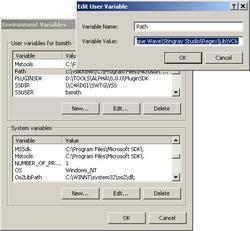
Mar 2, 2012
Repcached does not compile
If you want the tutorial on installing repcached, click here.
For the record, I am using:
Ubuntu 11.10
Linux 3.0.0-12-server #20-Ubuntu SMP Fri Oct 7 16:36:30 UTC 2011 x86_64 x86_64 x86_64 GNU/Linux
If you're getting this error when doing make for repcached,
memcached.c: In function âadd_iovâ:
memcached.c:696:30: error: âIOV_MAXâ undeclared (first use in this function)
memcached.c:696:30: note: each undeclared identifier is reported only once for each function it appears in
memcached.c: In function âprocess_statâ:
memcached.c:1127:9: warning: format â%dâ expects argument of type âintâ, but argument 3 has type âlong unsigned intâ [-Wformat]
memcached.c:1134:9: warning: format â%lluâ expects argument of type âlong long unsigned intâ, but argument 3 has type âuint64_tâ [-Wformat]
memcached.c:1138:9: warning: format â%lluâ expects argument of type âlong long unsigned intâ, but argument 3 has type âuint64_tâ [-Wformat]
memcached.c:1139:9: warning: format â%lluâ expects argument of type âlong long unsigned intâ, but argument 3 has type âuint64_tâ [-Wformat]
memcached.c:1140:9: warning: format â%lluâ expects argument of type âlong long unsigned intâ, but argument 3 has type âuint64_tâ [-Wformat]
memcached.c:1141:9: warning: format â%lluâ expects argument of type âlong long unsigned intâ, but argument 3 has type âuint64_tâ [-Wformat]
memcached.c:1142:9: warning: format â%lluâ expects argument of type âlong long unsigned intâ, but argument 3 has type âuint64_tâ [-Wformat]
memcached.c:1143:9: warning: format â%lluâ expects argument of type âlong long unsigned intâ, but argument 3 has type âuint64_tâ [-Wformat]
memcached.c:1144:9: warning: format â%lluâ expects argument of type âlong long unsigned intâ, but argument 3 has type âuint64_tâ [-Wformat]
memcached.c:1145:9: warning: format â%lluâ expects argument of type âlong long unsigned intâ, but argument 3 has type âuint64_tâ [-Wformat]
memcached.c:1146:9: warning: format â%lluâ expects argument of type âlong long unsigned intâ, but argument 3 has type âsize_tâ [-Wformat]
memcached.c:1149:9: warning: format â%lluâ expects argument of type âlong long unsigned intâ, but argument 3 has type âuint64_tâ [-Wformat]
memcached.c: In function âprocess_get_commandâ:
memcached.c:1331:19: warning: format â%lluâ expects argument of type âlong long unsigned intâ, but argument 3 has type âuint64_tâ [-Wformat]
memcached.c: In function âdo_add_deltaâ:
memcached.c:1573:5: warning: format â%lluâ expects argument of type âlong long unsigned intâ, but argument 3 has type âuint64_tâ [-Wformat]
make[2]: *** [memcached-memcached.o] Error 1
make[2]: Leaving directory `/root/memcached-1.2.8-repcached-2.2'
make[1]: *** [all-recursive] Error 1
make[1]: Leaving directory `/root/memcached-1.2.8-repcached-2.2'
make: *** [all] Error 2
For the record, I am using:
Ubuntu 11.10
Linux 3.0.0-12-server #20-Ubuntu SMP Fri Oct 7 16:36:30 UTC 2011 x86_64 x86_64 x86_64 GNU/Linux
gcc version 4.6.1 (Ubuntu/Linaro 4.6.1-9ubuntu3)
GNU Make 3.81
If you're getting this error when doing make for repcached,
memcached.c: In function âadd_iovâ:
memcached.c:696:30: error: âIOV_MAXâ undeclared (first use in this function)
memcached.c:696:30: note: each undeclared identifier is reported only once for each function it appears in
memcached.c: In function âprocess_statâ:
memcached.c:1127:9: warning: format â%dâ expects argument of type âintâ, but argument 3 has type âlong unsigned intâ [-Wformat]
memcached.c:1134:9: warning: format â%lluâ expects argument of type âlong long unsigned intâ, but argument 3 has type âuint64_tâ [-Wformat]
memcached.c:1138:9: warning: format â%lluâ expects argument of type âlong long unsigned intâ, but argument 3 has type âuint64_tâ [-Wformat]
memcached.c:1139:9: warning: format â%lluâ expects argument of type âlong long unsigned intâ, but argument 3 has type âuint64_tâ [-Wformat]
memcached.c:1140:9: warning: format â%lluâ expects argument of type âlong long unsigned intâ, but argument 3 has type âuint64_tâ [-Wformat]
memcached.c:1141:9: warning: format â%lluâ expects argument of type âlong long unsigned intâ, but argument 3 has type âuint64_tâ [-Wformat]
memcached.c:1142:9: warning: format â%lluâ expects argument of type âlong long unsigned intâ, but argument 3 has type âuint64_tâ [-Wformat]
memcached.c:1143:9: warning: format â%lluâ expects argument of type âlong long unsigned intâ, but argument 3 has type âuint64_tâ [-Wformat]
memcached.c:1144:9: warning: format â%lluâ expects argument of type âlong long unsigned intâ, but argument 3 has type âuint64_tâ [-Wformat]
memcached.c:1145:9: warning: format â%lluâ expects argument of type âlong long unsigned intâ, but argument 3 has type âuint64_tâ [-Wformat]
memcached.c:1146:9: warning: format â%lluâ expects argument of type âlong long unsigned intâ, but argument 3 has type âsize_tâ [-Wformat]
memcached.c:1149:9: warning: format â%lluâ expects argument of type âlong long unsigned intâ, but argument 3 has type âuint64_tâ [-Wformat]
memcached.c: In function âprocess_get_commandâ:
memcached.c:1331:19: warning: format â%lluâ expects argument of type âlong long unsigned intâ, but argument 3 has type âuint64_tâ [-Wformat]
memcached.c: In function âdo_add_deltaâ:
memcached.c:1573:5: warning: format â%lluâ expects argument of type âlong long unsigned intâ, but argument 3 has type âuint64_tâ [-Wformat]
make[2]: *** [memcached-memcached.o] Error 1
make[2]: Leaving directory `/root/memcached-1.2.8-repcached-2.2'
make[1]: *** [all-recursive] Error 1
make[1]: Leaving directory `/root/memcached-1.2.8-repcached-2.2'
make: *** [all] Error 2
Related discussion here.
Compiler says that IOV_MAX is not defined. I'm not really sure what this is, but it compiled fine on Ubuntu 10.04. I guess that const is not used anymore.
In memcached.c code, we can see that IOV_MAX is defined if the OS is FreeBSD or iOS, so I decided to just define it anyway.
Here is my diff of the code that made it compile, in case you need it.
57,59c57
< #if defined(__FreeBSD__) || defined(__APPLE__)
< # define IOV_MAX 1024
< #endif
---
> #define IOV_MAX 1024
Feb 28, 2012
PHP :: Advice on using count()
I may be a little late realising this, but a few dozen thousand lines of PHP code in, it's better late than never.
Let's look at example #1 on count() manual
http://php.net/manual/en/function.count.php
$result = count(null); // $result == 0
$result = count(false); // $result == 1
Does this strike you as a bit odd? Why the hell should count(0) or count(false) be equal to 1?
Well strangely enough, that's how it is. So for example, if you wrote a mysql_query() wrapper where you return false if the query fails and if you expect an array where you check the number of items, you find out that if the query fails, the count will return 1, and you might get some unexpected results.
Keeping computer security in mind, it's best to avoid count() when just checking if some data is returned.
Alternatives are empty() if checks if a variable contains something other than 0, '0', null, false, array() or ''.
OR, in your wrapper functions, if the query fails, just return NULL!
Let's look at example #1 on count() manual
http://php.net/manual/en/function.count.php
$result = count(null); // $result == 0
$result = count(false); // $result == 1
Does this strike you as a bit odd? Why the hell should count(0) or count(false) be equal to 1?
Well strangely enough, that's how it is. So for example, if you wrote a mysql_query() wrapper where you return false if the query fails and if you expect an array where you check the number of items, you find out that if the query fails, the count will return 1, and you might get some unexpected results.
Keeping computer security in mind, it's best to avoid count() when just checking if some data is returned.
Alternatives are empty() if checks if a variable contains something other than 0, '0', null, false, array() or ''.
OR, in your wrapper functions, if the query fails, just return NULL!
Subscribe to:
Posts (Atom)